Clonar una manera sencilla de entenderlo con JQuery
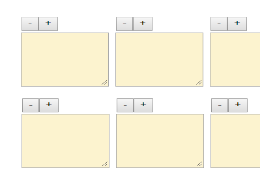
HTML
<div class="caja-mensajes">
    <div class="msj">
        <button id="remover">-</button><button id="clonar">+</button><br>
        <textarea rows="5" cols="40">Clóname</textarea>
    </div>
        <div class="msj">
        <button id="remover">-</button><button id="clonar">+</button><br>
        <textarea rows="4" cols="10">NO CLONAR</textarea>
    </div>
    <div class="msj">
        <button id="remover">-</button><button id="clonar">+</button><br>
        <textarea rows="2" cols="30">Me clonaron</textarea>
    </div>

</div>
CSS
textarea{
    background:#fcf3cf;
}
JS
$(document).ready(function(){

    //clonar
    $(document).on("click",".caja-mensajes #clonar",function(){

        var clonar = $(this).parent(".msj").clone(); //clonar
                     $(this).parent(".msj").after(clonar); //mostrar
    });

    //remover
    $(document).on("click",".caja-mensajes #remover",function(){
        $(this).parent(".msj").remove();
    });

});
Deprecated: trim(): Passing null to parameter #1 ($string) of type string is deprecated in /home/clas88ie/public_html/lib/general.php on line 254
Deprecated: trim(): Passing null to parameter #1 ($string) of type string is deprecated in /home/clas88ie/public_html/lib/general.php on line 254


Deja tu comentarioComentarios 1